Network Routing Table and Levels
The BSAP EIE requires a valid "RTU Config" (RTUConfig) data group to be retrieved before other data groups can be retrieved or sent. When configuring the "RTU Config" (RTUConfig) data group, the Network routing table values in the data group's View Data dialog box must be specified. The values entered in the Network levels fields are stored in the DDS and are not written to the device.
The Network routing table values specify the number of devices in each level of the network. This number must be correct, and it must be the same for all devices in the DDS that use the same network ID. Network ID is a property included on the Device page of the BSAP EIE device editor.
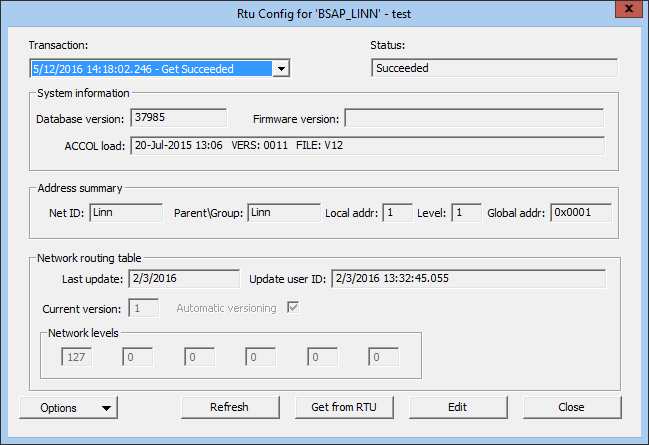
To Specify Network Routing Table Values
- Using CygNet Explorer, in the DDS pane, open the remote device.
- Click the Data Group page.
- Select the Rtu Config data group and click View Data.
- Click Edit. Once you are in edit mode, the button to save your changes is labeled Save to DDS.
- In the Network routing table section, specify the values in the Network levels fields. Be sure that you use the same values for all devices that share the same network ID. The network ID is shown in the Address summary section in the Net ID field and on the Device page in the Network ID field.
- To increment the Current version by one, check Automatic versioning. To keep the same version, uncheck Automatic versioning.
- Click Save to DDS.
- Click Close to exit the View Data dialog box.
- Click Apply on the Data Group page.

